Download
Download Heartopia MIDI Player
Download for free; the free features work right after you extract it. Unlock advanced performance features later with a Pro activation code.
Download: HeartopiaMidiPlayer.zip, then run HeartopiaMidiPlayer.exe
Heartopia MIDI Player is an unofficial, third-party auto-play tool that controls the game by simulating keyboard input. Using automation like this may violate the game's Terms of Service or fair-play policy and carries a risk of account restriction or suspension. Use it at your own discretion and risk; we are not responsible for any action taken against your account.
Before you use it
This is an unsigned app from an indie developer
Because it isn't code-signed, Windows and antivirus software may show warnings — that's normal. If you're willing to trust this file, follow the steps below to allow it. If you don't trust it, please don't download or use it.
① Antivirus may flag it
Auto-play tools like this simulate keyboard input, so antivirus software sometimes plays it safe and treats it as suspicious — or even moves it to quarantine. It is not a virus; it is a false positive. If the app disappears after downloading, or gets blocked the moment you run it, here is what to do: first, restore it from your antivirus quarantine and choose to trust or allow it. If you trust the app and do not want it blocked again, open Windows Security → Virus & threat protection → Manage settings → Exclusions and add the whole folder you extracted; it will not be scanned after that.
② If a blue warning appears when you run it
When "Windows protected your PC" appears, click "More info", then click "Run anyway".
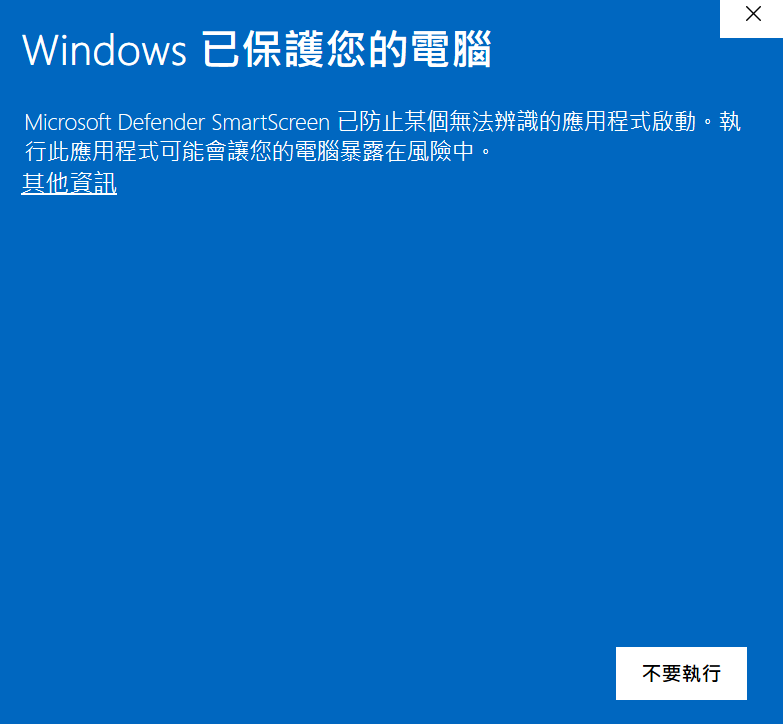
③ Allowed it but it still won't open?
On a few machines it still fails with a Python runtime error even after you allow it. That is usually Windows marking the downloaded files as blocked. Two steps to clear it.
Open PowerShell first: press Windows + R to bring up the Run box, type powershell, and click OK. Searching the Start menu for PowerShell works too.
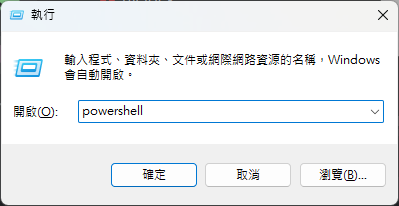
Then replace the double-quoted path below with your extracted folder, paste the whole line, press Enter, and open the app again. The example assumes Downloads and a Windows username of duduru:
Get-ChildItem "C:\Users\duduru\Downloads\HeartopiaMidiPlayer" -Recurse | Unblock-File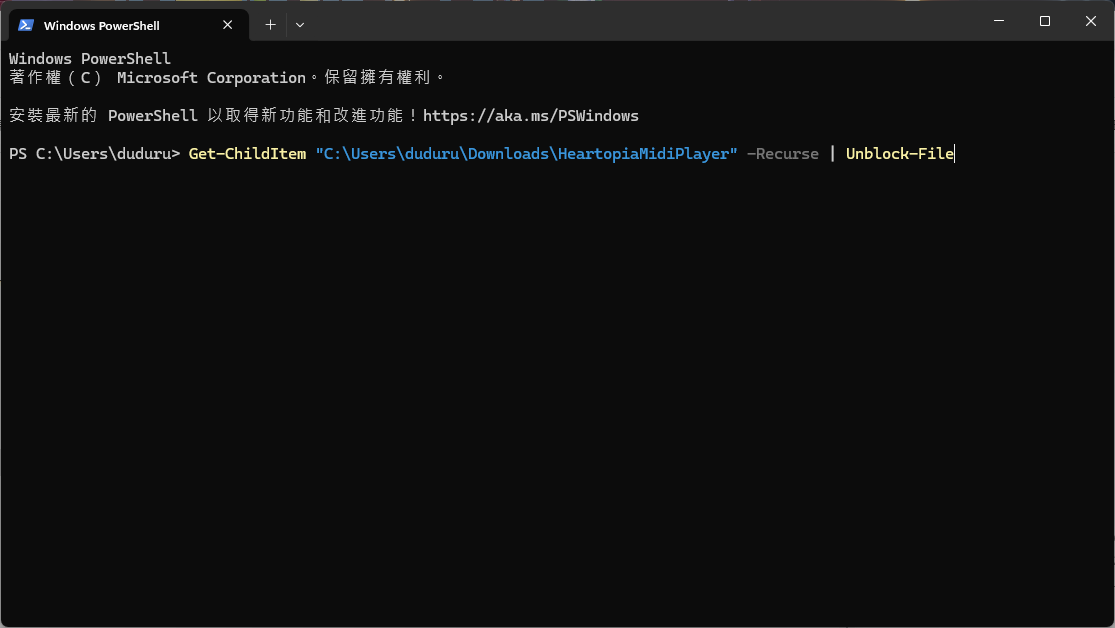
To get the path: Shift + right-click the folder and choose "Copy as path". What you get already includes the quotes, so it can replace the whole quoted part.
After extracting
- Open the app after extracting — the free features are ready to use right away.
- Import MIDI, convert, and start / stop playback without activation.
- Need advanced features? Paste a Pro activation code on the settings page to unlock.
Can't open it?
If it still will not open after the steps above, download the Debug build — it opens a black console window that shows the error.
Download Debug buildRun the Debug build, then email a full screenshot of the error shown in the black window to: [email protected] I'll use the screenshot to figure out the problem.
Want to unlock advanced performance features?
Resume from breakpoint, start from markers, playlists, custom scripts — a one-time purchase for lifetime use.